Biggest Shine 7 Buying Mistakes (And How to Avoid Them)
The premium mechanical keyboard market is often a minefield of marketing jargon, flashing lights, and hefty price tags. Among the most iconic entries in this space is the Ducky Shine 7, a flagship peripheral that has maintained a legendary status among enthusiasts for its uncompromising build quality and the unique use of a zinc alloy top case. However, because it sits at a significantly higher price point than mass-market plastic keyboards, many buyers approach the purchase with misconceptions. Investing in a flagship keyboard is as much about understanding what you are not getting as it is about celebrating the features present. To help prospective owners navigate this high-end purchase, we have compiled the most common pitfalls and mistakes made when acquiring a Shine 7, along with the technical nuances that define the experience.
The Evolution of the Shine Series
To understand the Shine 7, one must understand the legacy it carries. For over a decade, the "Shine" moniker from Ducky has represented the pinnacle of their full-sized keyboard lineup. While the One series focuses on versatility and accessibility, the Shine series focuses on material science and lighting innovation. The transition from the Shine 6 to the Shine 7 was marked by a dramatic shift in chassis philosophy. While previous iterations relied on high-quality plastics or aluminum, the Shine 7 introduced a specialized zinc alloy top frame. This material is significantly denser than aluminum, providing a "heft" that is rare in the industry. This weight is not just for show; it fundamentally alters the acoustics of every keystroke, dampening high-frequency vibrations that often plague lighter keyboards.
Despite its age in a fast-moving market, the Shine 7 remains a benchmark for out-of-the-box reliability. It utilizes a dual-layer PCB (Printed Circuit Board) for enhanced signal stability and longevity. Furthermore, it continues to use genuine Cherry MX switches, which, while standard, are implemented here with a focus on plate-mounted stability. This ensures that even during intense gaming sessions or high-speed typing tasks, the chassis does not flex or creak—a common complaint with cheaper mechanical boards.
Common Buying Mistake #1: Underestimating the Physical Dimensions and Weight
One of the most frequent errors buyers make is failing to account for the sheer mass and footprint of the Shine 7. This is a full-sized 108-key keyboard. It includes a dedicated number pad and additional four keys above the numpad for volume and calculator shortcuts. For users accustomed to "Tenkeyless" (TKL) or 60% layouts, the Shine 7 can feel like a behemoth on the desk.
The zinc alloy top case combined with the internal steel plate results in a weight of nearly 3.2 pounds (roughly 1.4kg). This makes it one of the heaviest mass-produced keyboards on the market. If you are a mobile professional who likes to carry your keyboard between the office and home, or if you frequently adjust your keyboard’s position during gaming, the Shine 7 may prove cumbersome. It is designed to be an "anchor" for a workstation—once placed, it is meant to stay there. Avoid the mistake of buying this for a cramped desk or a portable setup; it requires deep desk space to accommodate both the board and a comfortable wrist rest.
Common Buying Mistake #2: Misunderstanding the Zinc Alloy Finish
Marketing materials often highlight the "Zinc Alloy" construction, leading some buyers to believe the entire keyboard is metal. In reality, the Shine 7 features a zinc alloy top plate, while the bottom housing is still made of high-quality ABS plastic. This hybrid design is intentional—it allows for better cable management and weight distribution—but it can disappoint those expecting a full "unibody" metal experience like those found in custom boutique kits costing twice as much.
Furthermore, the "Gunmetal" finish on the zinc alloy has a unique texture and reflective quality. It is more matte than polished aluminum, which is excellent for hiding fingerprints, but it has a specific aesthetic that may not match all PC setups. Buyers often make the mistake of assuming it will match their silver or brushed-black aluminum PC cases perfectly. In person, the Shine 7 has a distinct, dark industrial look that leans closer to a charcoal grey than a traditional black.
Common Buying Mistake #3: Switch Selection Regret
Because the Shine 7 is a premium product, there is a temptation to pick "exotic" switches without testing them. The Shine 7 is typically available in a wide array of Cherry MX options, including Blue, Brown, Red, Black, Silver (Speed), and Silent Red. A common mistake is choosing Cherry MX Silver (Speed) switches for a general-purpose work-and-play machine. While "Speed" switches have a shorter actuation point that is theoretically better for gaming, many typists find them too sensitive for long-form writing, leading to frequent typos because the keys respond to the slightest graze of a finger.
Conversely, some buyers choose Cherry MX Blues for that classic "click" without considering their environment. The Shine 7’s rigid chassis actually amplifies the sound of clicky switches. If you work in a shared office or have a spouse nearby, the combination of the zinc alloy echo and the Blue switch click can be disruptive. For the most balanced experience that utilizes the Shine 7’s acoustic dampening, Cherry MX Browns or Reds are the safer, more versatile choices.
Common Buying Mistake #4: Overlooking the Software-Free Capability
Modern peripheral buyers are conditioned to download "bloatware" to customize their devices. A massive mistake many Shine 7 owners make is assuming they MUST use the Ducky RGB software to control the lighting. While Ducky does offer software for those who prefer a GUI, the Shine 7 is famous for its robust hardware-level controls. Nearly every lighting effect, color saturation level, and macro can be programmed directly on the keyboard using key combinations (Function + various keys).
Discover deals on Electronics — updated daily.
Shop Amazon →When buyers rely solely on the software, they often encounter bugs or compatibility issues common with niche manufacturers. The true power of the Shine 7 lies in its standalone nature. By learning the onboard commands, you can take your keyboard to any computer—even those with strict IT policies that block software installations—and maintain your custom profiles. Skipping the manual and failing to learn the hardware shortcuts is a disservice to the product’s design philosophy.
Common Buying Mistake #5: Expecting "Budget-Friendly" Value
The Shine 7 is not a value-proposition keyboard. If you are comparing it strictly on a "features-per-dollar" basis against brands like Redragon or even mainstream giants like Corsair and Razer, the Shine 7 might seem overpriced. It doesn't have a dedicated pass-through USB port, it doesn't have a built-in OLED screen, and its cable is a simple (though high quality) USB-C to USB-A.
The mistake here is viewing the Shine 7 through the lens of functionality rather than craftsmanship. You are paying for the PBT double-shot keycaps, which will never fade or develop a "shine" from finger oils. You are paying for the zinc alloy plate and the superior typing feel that comes from a rigid, heavy-duty build. If your priority is "the most features for $150," you will likely be disappointed. If your priority is "a board that will feel the same on day 1 as it does on day 2000," the Shine 7 is the correct choice.
Product Analysis: Why the Shine 7 Persists
The Shine 7 sits in a unique "middle ground" of the mechanical keyboard world. It is a "pre-built" luxury board. While the world of custom mechanical keyboards (Lubing switches, clipping stabilizers, custom foams) has exploded, the Shine 7 provides a "set it and forget it" solution for people who want a metal-class experience without the homework of building their own.
The inclusion of PBT double-shot keycaps is perhaps the board's strongest selling point. Most mainstream keyboards use ABS plastic keycaps with painted legends …
Pros and Cons
- Pro: Zinc Alloy top case offers unparalleled rigidity and an incredibly premium, heavy feel that suppresses deck flex.
- Pro: Genuine Cherry MX switches ensure high consistency across all 108 keys with a rated lifespan of 100 million keystrokes.
- Pro: High-quality PBT double-shot keycaps provide a superior tactile texture and permanent legends that will not fade.
- Pro: Hardware-level customization allows for complete control over RGB and macros without needing to install background software.
- Pro: Detachable USB-C cable makes the board easier to clean and allows for the use of custom coiled cables.
- Con: The weight and full-size footprint make it entirely impractical for travel or small "minimalist" desk setups.
- Con: Lack of "QMK" or "VIA" support—customization is limited to Ducky's proprietary system rather than open-source standards used in the custom scene.
- Con: No dedicated media keys or volume wheels; volume control requires the use of function layers or the four keys above the numpad which can feels less intuitive than a scroll wheel.
- Con: Price point is high enough that it begins to compete with entry-level custom aluminum kits which may offer more enthusiast features like hotswap sockets.
Comparison: Shine 7 vs. The Competition
To help visualize where the Shine 7 stands, the following table compares its core characteristics against a standard "Gaming" keyboard and a "Custom Build" enthusiast keyboard.
| Feature | Standard Gaming Keyboard | Ducky Shine 7 | Custom Enthusiast Kit |
|---|---|---|---|
| Top Case Material | ABS Plastic or Thin Aluminum | Heavy Zinc Alloy | CNC Machined Aluminum / Brass |
| Keycap Material | Thin ABS (Laser Etched) | Thick PBT (Double-shot) | High-end PBT or GMK ABS |
| Switch Mounting | Plate-mounted (Plastic) | Plate-mounted (Steel) | Gasket or PCB Mount |
| Software Dependency | High (Mandatory for RGB) | Optional (Hardware-driven) | Low (QMK/VIA driven) |
| Weight | Light (~0.8kg) | Heavy (~1.4kg) | Variable (1.5kg - 3kg) |
| User Effort | None (Plug and Play) | Minimal (Plug and Play) | High (Assembly Required) |
Comprehensive Buying Guide: How to Choose Your Shine 7
If you have decided that the Shine 7 is the right board for you, avoiding mistakes requires a systematic approach to the checkout process. Follow these steps to ensure the unit you receive matches your workflow.
Step 1: The "Environment Check"
Before selecting a switch, evaluate your room acoustics. The Shine 7 has a "ping" profile that is slightly different from plastic boards. If you are in a room with hardwood floors and high ceilings, the sound can carry. If silence is your priority, look specifically for the "Cherry MX Silent Red" version. This switch includes internal dampeners that, when combined with the Shine 7's heavy frame, create one of the quietest typing experiences available in a pre-built keyboard.
Step 2: RGB and Aesthetics
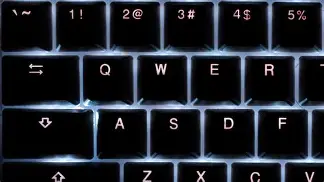
Ducky is known for its "Year of the..." spacebar artworks. While the Shine 7 is a standard model, different batches may come with different Chinese Zodiac spacebars. Some buyers are surprised to find a stylized "Tiger" or "Rat" on their spacebar. If you want a perfectly clean, professional look, check if the box includes the standard "extra" spacebar (most Shine 7 units do). Also, remember that the zinc alloy case has a "brushed" look; it doesn't look like a flat black plastic. Ensure this matches your monitor stand or desktop aesthetics.
Discover deals on Electronics — updated daily.
View Offers →Step 3: Understanding the "Non-Hotswap" Nature
Perhaps the biggest "modern" mistake is assuming the Shine 7 is "Hot-Swappable." In the current market, many keyboards allow you to pull switches out and replace them without soldering. The Ducky Shine 7 does not support this. The switches are soldered directly to the dual-layer PCB. This means the switch you choose is the switch you are stuck with for the life of the board, unless you are comfortable with a soldering iron and desoldering pump. Do not buy this board with the intention of "upgrading the switches later" unless you have technical modification skills.
Step 4: Power and Connectivity
Because the Shine 7 powers a significant number of RGB LEDs and a controller capable of hardware macros, it can be sensitive to power delivery. A common mistake is using the keyboard with an unpowered USB hub or a very long third-party extension cable. This can lead to "ghosting" or the lighting flickering. For the best performance, connect the Shine 7 directly to a USB 3.0 or 3.1 port on your motherboard's rear I/O panel. This ensures consistent 5V delivery to the board’s internal components.
Real-World Use Cases: Why Enthusiasts Still Buy the Shine 7
To provide a better perspective, we can look at the two primary demographics that favor this board: the "End-Game Gamer" and the "Lifetime Typist."
The End-Game Gamer is someone who is tired of the flimsy feel of marketed "gaming" peripherals. They likely use a heavy, high-DPI mouse and want a keyboard that feels like an industrial tool. For this user, the mistake to avoid is ignoring the height of the board. The Shine 7 sits somewhat high off the desk. To avoid wrist strain during 6-hour sessions, this user should always budget for a high-quality wood or foam wrist rest. The Shine 7 does not include one in the box, and using it "flat" can lead to an uncomfortable upward angle for the hands.
The Lifetime Typist is usually a coder, writer, or data analyst. This user cares about the "return" of the key. Because the Shine 7 uses a steel mounting plate beneath the zinc alloy, there is a very firm "bottom-out" feel. Unlike plastic keyboards that have a "mushy" end to a keystroke, the Shine 7 is crisp. The mistake here is often choosing a switch that is too light (like Red). Typists often benefit more from the tactile "bump" of Cherry MX Browns or the heavy resistance of Cherry MX Blacks to prevent accidental key presses while resting fingers on the home row.
Maintenance and Longevity Tips
Once you have avoided the buying mistakes and the Shine 7 is on your desk, maintaining the zinc alloy is slightly different from maintaining plastic. You should avoid using harsh chemicals or alcohol-based cleaners on the metal top plate, as this can eventually wear down the gunmetal coating. A simple microfiber cloth dampened with a small amount of water is usually sufficient.
The PBT keycaps are highly resistant to "shine," but they are "dirt magnets" due to their textured surface. Every six months, it is worth using a wire keycap puller (included with the board) to remove all caps and soak them in warm soapy water. Avoiding the mistake of using a "plastic" ring keycap puller is vital—plastic pullers can scratch the sides of premium PBT caps, whereas wire pullers are gentle and flexible.
Conclusion
The Ducky Shine 7 remains one of the most respected full-sized mechanical keyboards in the world for a reason. Its blend of industrial materials, hardware-level sophistication, and legendary durability makes it a unique proposition in a market flooded with disposable plastic. By avoiding the common mistakes of underestimating its size, misunderstanding the switch types, or over-relying on software, a buyer can ensure that their investment provides a satisfying tactile experience for years to come. It is a board for those who value the "thud" over the "clack" and who want their peripheral to feel like a permanent part of their workspace architecture. While it lacks the trendy hot-swap sockets of newer competitors, its structural integrity remains the high-water mark for production keyboards. If you have the desk space and a preference for quality over gimmicks, the Shine 7 is a purchase that rarely leads to regret, provided you know exactly what you are bringing into your setup.